In the office and on site
Keep the day moving.
01 On the road
Give every worker their own run sheet.
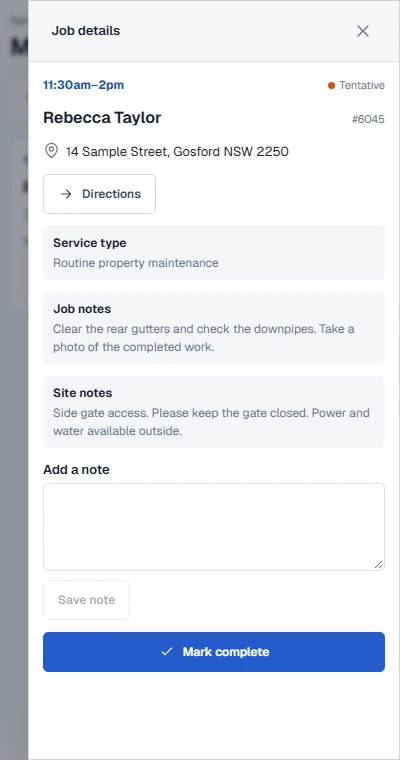
Workers open My Jobs to see their day in order. The address, directions, site instructions and job notes are all with the booking.
- Call or text the customer from the job
- Add notes and mark work complete on site
- Keep the scheduler for staff who need it
02 Back at the office
Know the history before you book again.
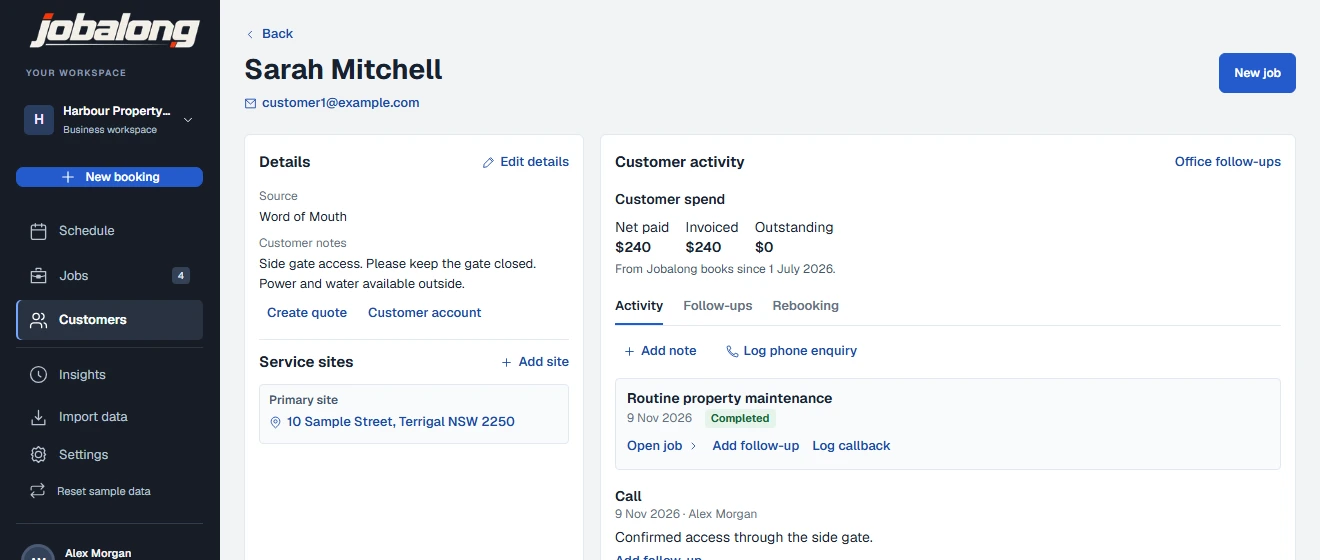
Open a customer record to see their sites, previous jobs and follow-ups. Flag a customer when future service needs a warning.
- Keep access instructions with each site
- See customer spend from posted invoices
- Start a new booking or quote from the customer record
What’s included
Explore the features.
Scheduling
- Day, week and month calendar
- Technician filters and booking tray
- Find a slot, waitlist and recurring jobs
Jobs in the field
- Mobile scheduling for office staff
- Worker-only access to assigned jobs
- Directions, site notes, checklists and photos
Customers
- Contact details, sites and job history
- Follow-ups, rebooking and customer spend
- Booking warnings for flagged customers
Quotes and invoices
- Service catalogue and itemised pricing
- Branded quotes with online approval
- Shareable invoices and PDF downloads
Timesheets
- Clock in and out
- Manual entries and corrections
- Weekly review and approval
Bookkeeping and insights
- Receipt scanning and bank CSV import
- Chart of accounts and financial reports
- Booking, availability and revenue snapshots
Bring jobs and customers across with a CSV import. Export filtered jobs or your customer list when you need them.